Showing posts with label Create. Show all posts

Friday, 25 November 2016

It's that time already?!

I know I am not alone in wondering where on earth time has gone. The quote below represents progress. Day by day it would seem that nothing drastic has happened - no absurd changes. But, when I look back to the first term, wow - how I have grown, how WE have all grown as educators. It seriously amazes me. 


Image result for time goes fast quote

Our very last day at digital immersion was, of course, a highly practical one. We were required to create digital CVs - simply by creating a google site. This was an opportunity to showcase our talents, so to speak, to show what we are capable of, all the creative things we have done, all accessible from the one place. Another of the MDTAs, Chelsea, shared some helpful tips in creating her site. Like me, she is all about the aesthetics so I was excited to explore these sites she shared (I could have spent all day looking at these sites). The first is coolors - a site which generates perfect colour combinations for us to use in our every day designs! The second one is 100daysoffonts which is sort of the same concept, except it shares combinations of fonts. 

As for my CV... I'm still in the process of updating it and playing around with fonts and what not, but I will definitely share on here as soon as I am finished. Above is a little sneak peek of what it currently looks like. I love my colour scheme (taken from coolors.co of course!) Really excited to hopefully share this site one day soon. Yay for progression and all the HOORAY cheers in the world to the Manaiakalani Digital Teachers Academy! 


Friday, 21 October 2016

The question of courage

Term 4. Beginning Teacher survival mode is slowly being turned down and finally, finally, I feel I have some space in my mind to explore concepts and ideas  that would otherwise be subconscious beliefs manifesting themselves into my teaching practice. Today’s digital immersion session gave us the opportunity to reflect on the importance of engagement and the levels of engagement of which we provide to and receive from our learners. A 2 minute video of Chrissie Butler (Core education) talking Universal design for learning, challenged me instantly - we often default to teaching the way we learn - but who is to say that the way we learn is the way that others learn, as a matter of fact, we all know IT’S NOT! The challenge then is to design learning where a range multi-modal access points to the learning is provided so that no matter how learners prefer to learn, they can.

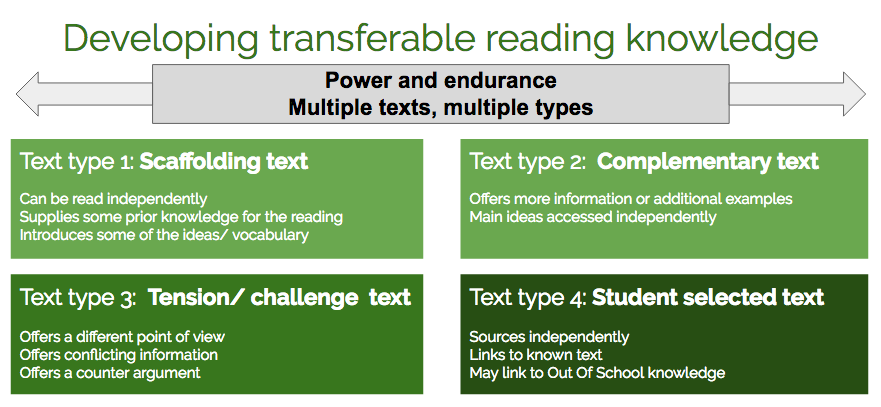
True to Manaiakalani pedagogy, we were given some time to CREATE to make meaning and apply our understanding of the elements we explored today. For those of us who felt like we already had behavioural engagement were given the challenge to achieve a learning resource which incorporated the following levels of text:  

When our Hub returns from Camp, we will be exploring the concept of courage, growth mindset as well as the concept of ‘dispositions’. In practicing creating a resource which covers the above elements, I decided to collate resources which explored the concept of courage in a range of different concepts. Below is a screenshot of the site page so far - will reflect on the unit along the way. Stay tuned!


Friday, 23 September 2016

Come on baby, light my fire!

The purpose of an ignite talk is to enlighten your audience, but doing so quickly! In an ignite presentation, Presenters get 20 slides, which automatically advance every 15 seconds. The result is a fast and fun presentation which lasts just 5 minutes.

Me, standing by, as a video plays as part of my ignite presentation

Today the MDTA cohort were given the challenge of creating an ignite talk about a given topic. (When I say given, I mean drawn out of a basket a few hours before presenting!). There was one extra topic that could be chosen, had someone wanted to swap what they received - that person ended up being me and my topic changed to Carol Dweck's revisiting of the 'Growth Mindset'. I felt the actual presentation was a nightmare, with my preparation not feeling complete, my slides not automatically advancing despite my tinkering with the settings, and of course, me having WAY too many words to each slide, meaning I fell behind and what I was saying did not match with what was on the screen! Ah! It makes me cringe just thinking about it. Obviously this was a great learning experience and if I ever had to curate a quality ignite talk within a few hours again, I would focus on getting the technical parts working at the beginning, a word to represent each slide, and a script that was finely timed with the moving of the slides, rather than the aesthetics of each slide!

Below is not my live ignite presentation, but rather a recording of my presentation with some audio on top. If you would like to see how to do this, see this YouTube video!


Friday, 16 September 2016

Getting kinaesthetic with Keynote

I must admit, prior to today, I had never used keynote as a presentation tool and honestly had no intention of doing so. This makes me wonder what other gem of applications and programmes are out there that I just haven't given the time of day!

Today we discovered a world of opportunity to create and customise within Keynote! Despite not having the major 'ability to collaborate' Keynote has many other features which we were introduced to and given the chance to explore and experiment today! 

One of the awesome features of keynote that I had already used was it's ability to make buttons for my Hub Google site as seen below. The ability to insert a shape and put a picture inside it makes it perfect for customising your buttons so that rather than just plain old text, sites get a multimodal sort of feel to them! 

Another fabulous feature which I quite enjoyed but ran out of time to do was the 'magic moves' feature. This is an awesome way to display pictures within a presentation - I will definitely be trying it next time I have a need! See the video below for a really helpful tutorial.


I also had a play with using Keynote as a tool to create a stop motion animation using images. I used the instant alpha tool (okay, this might be my most favoured thing about keynote!) to remove the bird featured in the following 4-second clip from quite an intricate background. 


And there you have it, I am sold on Keynote! Am looking forward to exploring this really nifty tool further next week! 

Friday, 9 September 2016

Editing etiquette

Image result for editing filmToday we were lucky enough to have the WHOLE day to edit our Manaiakalani Film festival entries. Despite my last post of feeling quite unorganised, I feel like the entirety of this year's Fridays, up until now, have scaffolded us really well for this day! The iMovie little tips and tricks come in handy when splitting and merging clips and all of the filming has been done with the camera in a landscape position rather than a portrait one! Yay.

Although we had the whole day, I spent most of the day editing about a 5 second piece in my film because I didn't have one clean shot of a really significant scene of dialogue between two characters - this meant that instead of one clean shot, I had to cut to one learner's face, then to the other and then back to the original, all the while ensuring the voice over matched the image - what a mission! Had I been as organised as my last post fantasized, I would not have had this problem! Just as well we had the time to edit today!

It was brilliant to be able to play the small portion of my film that was ready to my colleagues to receive feedback about what could be done differently, Dorothy forewarned us that when it is our project with our lovely learners within the scenes it makes it hard to edit objectively! It also really helped to have the big loud speakers when playing back our film, as it made it possible to hear any discrepancies in the audio.

A couple of reflection points:

  • As I was editing today I wished that I had taken more shots at different/interesting angles
  • I think this year I addressed an issue that I noticed was quite prevalent within our school community. Next time, I would like more learner voice in the say of the topic of the movie. 
  • I'd like to take a moment to acknowledge how easy it is to edit on iMovie. I can only wince in pain as imagine what people 'back in the day' would have to go through to edit films!

Friday, 2 September 2016

Filming for the Manaiakalani Film festival

I had a lecturer at university who always used to say...

"You don't know what you don't know until you know it"

My peers used to get annoyed but I loved the truth that was in it! As you might have guessed, this was my experience when Filming for the Film festival. We had been prepped in every way possible by Dorothy, but I still had no idea what I was in for!

I had the storyboard all mapped out, the props, the timetable of shooting, the sounds I would use...

What I hadn't anticipated was...

  • The ability levels of my actors
  • The haircuts they would get (we filmed over a number of days)
  • The different shirts they would wear (short polos and then a long sleeve)
  • The weather! 
  • The technology breaking down (microphones not working)
  • Learners being away
  • The giggles throughout filming!
  • The wind
  • Finding time to re-shoot scenes when they don't work out the first time (or second or third time)

I guess my main learning in all of this is to be as organised as possible, test your equipment BEFORE you start shooting, get as much shooting done in one day to ensure continuity across scenes and start as early as possible so you not only have ample time to edit, but also to reshoot!

Really looking forward to editing the footage and creating my first Manaiakalani Masterpiece!

Below is my favourite blooper - so many amazing facials from this aspiring actor! 


Friday, 12 August 2016

Getting wise with Garageband

Today the MDTA cohort had Rob Wiseman of Point England School come and spend the day. Rob came into the education sector with 6 years of teaching music behind him so we were fortunate to have him as our Garageband guru for the day!


The practical tips I have compiled above have been done so with movie making in mind, with the fast approaching Manaiakalani Film Festival on the horizon. The most important lesson from the day was that you don't have to be musically inclined to create something that sounds good on Garageband or to have high quality voiceovers - as Rob made sure to point out, Apple has created Garageband so that it is user-friendly for the inexperienced, yet has the ability to allow experts to create complex pieces. I am eager to get some filming done so I can have some serious sandpit time with these new skills!

Monday, 8 August 2016

Intriguing infographics!

The practical component of the August PLD gave us the opportunity to have a go at creating an infographic.
Taken straight from the PLD Slides. You can find them here!
They provided us with a helpful website which features an infographic that helps you to... yep, you guessed it, decide which is infographic is best suited to your needs! At the bottom of the page you will find the first ever infographic I created using canva.com. I have used this app to create masterpieces in the smallest amount of time. Very easy to use interface and for the most part, free!

I was excited to use this new knowledge of using infographics to help present information in a way that is much more digestible with my learners. The following is what I created to use with my learners in a series of lessons about introductions to speeches. It was much more fun to create than a Google Presentation (I created it using Google Draw) and the learners seemed to be able to engage with the information with relative ease!


Aaaaaand for those with the 8 second memory span, see below for a summary of my Blog analytics...


Saturday, 6 August 2016

Sketchnoting - Take 2


Behold, my second attempt at Sketchnoting. Hand on heart, I can honestly say that although more time consuming, thinking of pictures to represent the abstract consolidated those ideas in my mind more so than simply reading notes; not to mention this is a MUCH easier way of reminding myself about what the Summer Learning Journey entailed. See more on this empowering research here.


Friday, 27 May 2016

A Practical learning process

For breakthrough this term our Hub thought we would try something different. As a vehicle to explore effective communication in our Hub, we have embarked on a collaborative breakthrough project whereby the overall success of the project requires full effort and participation from each and every learner. From roles such as project managers, case creators, location managers, administration and travel team and a fitness team to prepare us for the big day, each learner has a vital role to fulfil. As the weeks progress, learners NEED to develop their skills of effective communication in order to collaborate. 

Today in Digital Immersion at the Tamaki Campus of the University of Auckland, the MDTA cohort experimented with Stop Motion animation. I decided to create my short movie around geocaching, and more specifically, the role that the Stonefields Learning process and learner qualities can play when we find ourselves stuck in the learning pit. Although quite time-consuming, Stop-motion animation is very easy to use once the content has been planned and all props are ready to go! The actual shooting of the photos took about 20 minutes, whereas the planning and editing took much longer. I look forward to sharing this with my learners and hearing what they might like to use this tool for. Video below...


Saturday, 21 May 2016

iMovie 101

This week's highly anticipated session revolved around iMovie basics. Having never used iMovie before and having never been proactive enough to seek out online tutorials, I was thrilled to have the opportunity for small group mentoring on iMovie basics.

Not knowing anything about how the tool works, iMovie looks quite intimidating. You know what you want to do but you just don't quite know how to do it. Having some sandpit time to make a movie without any expectations of quality and content allowed us to explore and discover the many functions of iMovie, all of which were so easy to access and apply as long as you simply know how!

I was able to make the following movie within a couple of hours. The overarching theme: A day in the life of a Hub 5 learner. 


If I did it again, there are a few things I would have done differently
Putting on my reflective teacher lense, I took more than just the tangible skills away from today's session. Had we been put on the spot to create a video to be submitted for judging, there would have been more pressure on learning the technical skills and we would not have been able to put much effort into the actual content. Allowing us the time to play however, meant that we were able to build our confidence in using the tool so that when we are required to use it for an authentic task, we can focus more on the content. The same goes for my learners. When introducing a new digital tool it is important to let them play before hand so that when they are required or want to use it for a specific task, they spend most of their energy developing content rather than exerting most of their energy to learn technical skills. Definitely something I am going to be more aware of when in the classroom. 


Monday, 16 May 2016

Manaiakalani BT's Connect

Earlier his week our digital immersion day led us to Panmure Bridge School, where we had the opportunity to connect with our colleagues who are also new to the digital 1-1 environment within the Manaiakalani Cluster.

Fiona led the session on learning to create and creating to learn. The first creation required us to work in groups, creating an advertisement for an idea or a product within 15 minutes. Our group chose to sell an idea, the idea of 'take the lid off'. With our teacher lenses on, we interpreted this idea as the act of allowing creativity into the lives of our learners. The following video was the result...


Our second physical creation of the day was encouraged to be a digital artefact an was to be based on our teacher as inquiry focus. I spent all afternoon exploring new digital tools - stop motion animator, animaker and trusted Ol' iMovie, and yet I was unable to decide on which tool to use, having started a project within each of the applications. I reflected on my learning and having had a late night the night before, I empathised with my some of my learners - the pressure to create with so many options, not enough ideas and not enough sleep had me feeling exhausted and in all honesty, a little bit stressed! I needed more time. Which is exactly what I had. A few days later, having had a bit more exploration time, I was able to create the following...


Friday, 6 May 2016

Snap Happy

Google Photos - Collage of Maungarei

Todays session had two elements to it. For the first part of it, we explored parts of the Cybersmart curriculum and talked about the difference between being Cybersafe and Cybersmart. The main point of difference for me I guess, was the fact the being Cybersafe has a focus on the preventative measures one should take to remain 'safe' online, where as being Cybersmart focuses on empowering the device user. A point that really stood out for me today was when Fiona Grant was speaking about creating a Smart Footprint. Her point was that when a learner is new to their own device, it is like their own private world, they are understandably, with deliberate teaching, are unaware of how visible every move they make online really is.

The second element of today was the focus of using still images and the accessibility and transfer of these from and to iPhones and Macs. We explored Google Photos and the creation of collages, as well as the ease of creating photo slideshows with Youtube. The collage is comprised of images I took of Maungarei and the youtube Slideshow...well, please view to see!


I am looking forward to utilising this new skill of creating REALLY EASY Youtube Slideshows to put on our Hub site as well as sharing this new knowledge with my learners!

Friday, 15 April 2016

One down, three to go!


What an amazing, surreal 11 weeks it has been. I feel like I am about to write an Oscar acceptance speech! To my mentor, Ollie Baker... To my Mother... In all seriousness, this term has provided me with the opportunity to learn from so many skilled and innovative practitioners as well as such inquisitive and welcoming learners...and it is only just the beginning.

The highlight of the term was, without a doubt, the strong foundation of relationships created within the learning environment; colleague to colleague, teacher to learner, as well as developing an identity of myself as a teacher (a never-ending journey, I am sure).

Now that I have spent a term finding my way, in terms of relationships and identity and belonging to Stonefields, my next step is to exert more energy in developing my Pedagogical Content Knowledge (PCK) and finding innovative and engaging ways to explore the world through my PCK and the New Zealand Curriculum with my learners. I am rearing to go, but at the same time, about to collapse into a weekend long hibernation. On that note, another highlight for me has been my ability to balance. I came into the term with a real mindfulness about my wellbeing, an awareness of the need to keep all tanks fulls so that come the holidays, I wouldn't crash and burn. Although it has been hard to get back into the swing of all things uni-related, post-grad has been surprisingly eye-opening and enlightening, and the days of digital immersion have been SO engaging and practical! Still ready for a good sleep-in though ;)

And just quickly before you go...

Speaking of practical digital knowledge, here is a sneak peak (still draft stage) of our new Hub site I have been designing! Cannot wait to get it up and running next term!


Monday, 4 April 2016

Learner buy in

I have been reflecting a lot lately about how to cause buy in from my learners. Too often, already, I have had learners saying "I'm bored".

My reaction: NOOOOOOOOOOOOOOooooooo.......


When I hear this I know I have been unsuccessful as a teacher. I have lost authenticity, I have lost engagement and I have lost the opportunity for learning. Of course I know it is not this dramatic, I can get it back, but for me it was a shrill alarm bell, a definite cause for concern! It was a moment of realisation: I was not teaching to how they best learn. So I have made some immediate changes. Now, when planning, I am being sure to plan for some type of movement linked to the learning; not separate fitness or brain breaks, although they are good too, but actual movement that consolidates or compliments, the learning.

In considering different perspectives during literacy, we used freeze-frames where the teacher comes along and taps the shoulder of a particular character, and the character then shares their thoughts and feelings etc. 

Not an "I'm bored" to be heard.

Planning for movement, and engagement, has required more thought on my part, but not much more. I know that the more I plan for interactive and engaging learning, the more I can draw and build on these ideas for learning activities. 


Friday, 1 April 2016

Thinking critically about current events


This has taken me far too long, but I finally got there! Here is a snapshot of the first decent looking site I have created. Presenting... the Manaiakalani Current Events site!


The MDTA Cohort was assigned the task of creating a site which would be used primarily by teachers of learners at year 2/3 to year 9 at High School. The site aims to provide a clear structure to address Current events in a way that encourages critical thinking through the exploration of different perspectives. The great thing about this site is that, should you not care for the content within our pages, the HTML of the page has been attached at the bottom of each page as an RTF (Rich text file), making this layout accessible to all!

The need for this site was brought about by a current teacher of Year 9 Social studies at Tamaki College, Auckland. Wanting to cover current events in his class but struggling to get depth from his learners, one teacher came to us in his quest for improvement.

The pages within this site have been designed to appeal to learners of all kinds, providing information about an issue through a range of media i.e. Videos, audio files, pictures, and articles. By breaking content into bite-sized pieces, the pages within our site seek to make exploring perspectives much more accessible through multi-modal prompts.

True to Manaiakalani 'Learn, create, share' pedagogy, each page suggests a form of creation to come from the perspectives the pages prompt exploration of.

Something that I found quite challenging, asides from the fun technical difficulties to do with HTML, was choosing the content to put on my page, as I didn't really have a clear idea of what it was I wanted my learners to come out of the sessions with. Once I painted a more vivid picture of what it was that I wanted them to explore and consider, I was able to add and delete content more purposefully.

The designing of this site prompted me to think about how often I provide quality and unique opportunities for my learners to create. It also gave me really practical skills to use when creating a site! Probably the most valuable thing I took away from this task has been my level of engagement. When the task was introduced, I was almost wriggling in my seat, rearing to go, I just wanted to get started. The ownership, the motivation, the engagement, it was all there; it got me thinking "is this how I am making my learners feel? If not, what can I do to make them this excited to get stuck into it?"

I am very much looking forward to working on my next site, stumbling through problems, problem-solving, and emerging victorious! (with other people's help, of course).

A few posts ago, I mentioned how HTML seemed a whole world away. Look at us now.

Saturday, 12 March 2016

Digital Learning Objects (DLOs)

Today the MDTA Cohort had their first Block course for the Accelerating Learning paper. (9am - 3.30pm on a Saturday) and it wasn't even that bad! In groups, we read a reading about a Learning theory. We then had to create a summary to share with our colleagues. From the summaries of learning theories, we chose one to translate into a unique Digital Learning Object (DLO). Below is our (Myself, Amy and Hannah) translation and application of Siegler's theory of learning in a Basketball context!


Friday, 11 March 2016

Creating to Learn - The importance of creative expression

The pedagogy of Manaiakalani "Learn, Create, Share" for me is quite often thought of as a linear process, as I often hear the words in that order and that order alone. This morning's session reminded me that this is not the case; Dorothy helped to unpack this understanding by asking what opportunities we provided for our students to learn through creation. Within these first few weeks it has been easy to default to 'what are we learning, what can we create to show this learning and how and where can we share it?', when in fact in reality it is far from this linear thought process. In thinking more deeply about what opportunities I provide for learners to engage in learning through creating, I see I have not been as slack at it as I had originally thought. Of course, through the process of creating, learners can consolidate knowledge and gain knowledge or understandings along the way. Overcoming obstacles and reflection, whether through self-reflection or questioning from others, allows individuals to learn during the creation process.


One wondering that I have often had, I think due to the high number of texts read throughout University that emphasise the importance of creative expression in Education for our Maori and Pasifika learners is, is how relevant is this to Pakeha learners in high decile Schools? How significant is this 'creative expression' to these learners? When in fact some research has said that the traditional school system works in favour of the dominant Western culture. Is creative expression part of the traditional school system? (Not my opinion, just a wondering based on what I was fed during Under-grad studies). I guess the fact is that from what I have seen so far, all learners, regardless of their ethnicity or culture, love to create things, so many different things, after having learnt something, they love to create things to show their learning and now that I think about it, they are always learning when they are creating, whether it be content knowledge or new skills.

From here, my next steps are to be mindful of the opportunities I am providing for students to learn through creation, to think outside the box when thinking of 'creative expression' and to start to rewire my brain from seeing learn, create, share as a linear process to a complex, intertwined, cycle.

Friday, 4 March 2016

HTML

Today completely changed my perspective of all things technology. Prior to joining the MDTA, using technology in innovative ways was a concept that seemed quite far-fetched. Things like creating QR codes, creating your own site, embedding things using HTML seemed like something only experts would be able to do. Now I see that these things (and a whole universe more) are easily within my grasp when I know what I am looking for, have experts to turn to, and Google at my fingertips!

During class today we experimented with Google Sites and had a go at embedding different kinds of resources on to one page e.g. videos, audio files, images and files (sheets, docs, slides, etc.) Below is a picture of my Sandpit site!


It was tricky at first, but evidently, the more I played around, the easier it got. The picture above is  while I was (and still am) 'in the process' of creating. What's exciting is that there is still so so so so so much to learn. The challenge here is to think about what I am doing with my learners at School that I could do more effectively using Google sites. Up until I now I have been using a site called Blendspace, which is great at creating a one-stop shop for my learners but in using Google Sites, I can keep all the learning in one place, making it more easily accessible for my learners. It also looks more aesthetically pleasing! (personal opinion). I really enjoyed building on my knowledge from todays learning by watching this slightly lengthy (but surprisingly not boring) introduction video to HTML.


Looking forward to next Friday!

Friday, 19 February 2016

Digital Upskilling: Google Sheets and Google Forms

In Digital Immersion this week we delved a little deeper into how to use the Apps Google Sheets and Google Forms, as well as having a play around with Add-ons to use within Google Sheets (there are so many Add-ons!).

As part of our learning we made a quiz on Google Forms, which as some of you may or may not know exports all the individual input to a single Google Sheet! Using the Add-on Flubaroo in Google Sheets we were able to take any number of answers, set the default (correct) answers and then Flubaroo went ahead and marked all of the answers for us!

Another part of our learning this week was sharing the ways in which our schools (previous and current) use these apps. Some of these innovative ways sheets are used are:

  • Student progression sheets - A table format for students to inform their next steps, and a place to link in their evidence to justify their understanding of a specific progression. 
  • A booking system where students can book in a time with the teacher to get more support in a particular subject.
  • Weekly timetables
  • A place for students to link their blogs so that Teachers can access all of the blogs from one place
Some ways Google Forms are used in the classroom are:
  • Collecting Student voice
  • Collecting Student prior knowledge

That was all in a few hours! I am really looking forward to taking the time to explore these apps further. The 'creation' part of todays session was to have another play with Google Draw and create another graphic representation of the days learnings and wonderings. My reflective question for the day was "How can I use these tools to manage existing documents and information more efficiently?" so not only thinking about what amazing and innovative new things I can come up with, but also think about what I already have in place and how I can improve them using these tools.

Digital Immersion: Week 2 Reflective Graphic